Sunday, 4 October 2015

Forms Personalization in Oracle Apps R12 Example: Zoom Functionality

Requirement:  
1.       Add an option named “Responsibility Details” to Tools Menu of the “APPLICATION USERS” Form.
2.       By clicking the option said in requirement 1, the user must be able view the complete details of the selected responsibility via  “DEFINE: RESPONSIBILITIES” forms
3.       Independent  Functionalities  of “USERS” and “RESPONSIBILITIES” FORM should not get impacted
Implementation Steps:
Step1: Open the “Define User” Form from “SYSTEM ADMINISTRATOR” Responsibility

Step2: Open the personalization form by following the navigation shown below

  
Step3: Add a Menu Entry under “Tools” Option with the name “Responsibility Details”.
Step 3.1: Add a new Form rule named “Add and Enable a Special Menu under Tools Menu” with the triggering event as “WHEN-NEW-FORM-INSTANCE” as shown below,
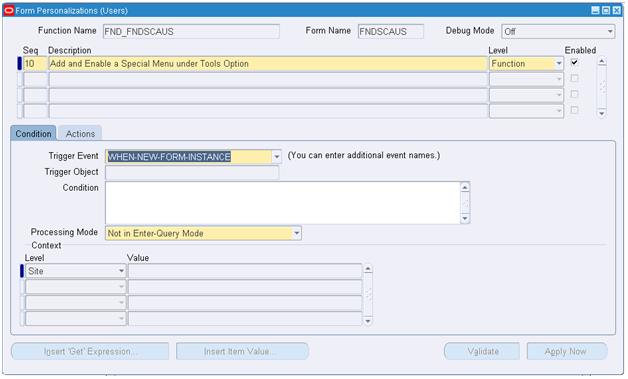
Step 3.2: Add an action to create an entry under Tools menu


Step 4:  Create and Initialize the GLOBAL_VARIABLE.XX_RESP_NAME with the “Responsibility name” and call the function corresponding to “Define: Responsibilities” Form i.e. FND_FNDSCRSP
Step 4.1: Add a rule with the triggering event “SPECIAL1” with the condition “:USER_RESP.RESPONSIBILITY_NAME IS NOT NULL” as given below

Step 4.2: Add an action to create and initialize a global variable with the Responsibility name i.e. Like “Application Developer”

Step 4.3: Add an action to launch the function corresponding to “Define: Responsibilities” form as below

Step 5: Invoke the Personalization form of “Responsibilities” form and perform the action to initialize “INITIAL VALUE” of the global variable “XX_RESP_NAME” as NULL. This action is to maintain the normal functionality of “Responsibilities Form”.
STEP 5.1: Invoke personalization form of “Responsibilities Form” as below

Step 5.2: Add a rule to create a global variable if not exists and assign a NULL to its “INITIAL VALUE” 


  Step 5.3: Add an action to navigate to the block “RESPONSIBILITY”
  
STEP 6: Add a rule to perform the below actions with the triggering event as “WHEN-NEW-BLOCK-INSTANCE” of “RESPONSIBILITY” block and triggering condition as “:GLOBAL.XX_RESP_NAME IS NOT NULL”.
  1. Change the “Default where” Property of the responsibility to restrict the query to single responsibility
  2. Run the built in “EXECUTE_QUERY”
  3. Nullify the global variable “XX_RESP_NAME”  


  STEP 6.1: Change the “Default where” Property of the responsibility to restrict the query to single responsibility
 Step 6.2: Run the built in “EXECUTE_QUERY” to perform auto query
 Step 6.3: Create a action to nullify the global variable
 Testing of Our Implementation:
 Navigation:

Testcase 1: “Responsibility Details” Option Disabled during Enter Query Mode

 Test case 2: “Responsibility Details” Option Disabled When cursor is not in the block displaying “Responsibility” Details
                              
 Test case 3: “Responsibility Details” Option enabled When cursor is in the block displaying “Responsibility” Details
 Test case 4: By clicking the added option “Responsibility Details” the user must be able to see the responsibility details via responsibility form
For example: The cursor is in the field Responsibility with the value “Application Developer” in the user form as shown in the above screenshot. So if the user clicks the  “Responsibility Details”  option, it should auto navigate to responsibilities form and auto query for the responsibility name “Application Developer”

 Test case 5: Normal Functionality of the responsibilities form should not got impacted like “Running a Query” , “Creating a Responsibility” etc  because of this forms personalization


PROFILE OPTIONS IN ORACLE APPS R12 - OVERVIEW (FND PROFILE)

Definition:

Profiles are the changeable options which affect the way Oracle Application runs. Moreover, Moreover, The profile option acts like a Global Variable in Oracle. It is needed to provide the flexibility to Oracle Applications.

Types:

The profiles are of two types those are given below.
1. System Profile and
2. User Profile.

About DIFFERENT LEVELS a Profile value can be set:

The Profile values will be set in different levels those are given below.
1. Site
2. Application
3. Responsibility
4. User
5. Server
6. Organization

Site: This field displays the current value, if set, for all users at the installation site.
Application: This field displays the current value, if set, for all users working under responsibilities owned by the application identified in the Find Profile Values block.
Responsibility: This field displays the current value, if set, for all users working under the responsibility identified in the Find Profile Values block.
User: This field displays the current value, if set, for the application user identified in the Find Profile Values block.
Profile: Enter the name of the profile option whose values you wish to display.

Navigation to set Profile Values

 SYSTEM PROFILE: 

Responsibility SYSTEM ADMINISTRATOR -->


You may search for profile options using character strings and the wildcard symbol (%). For example, to find all the profile options prefixed by "Concurrent:” you could enter "Conc%" and press the Find button.


PERSONAL PROFILE:

Responsibility SYSTEM ADMINISTRATOR -->

To view personal profiles enter into the query mode and enter the profile name which we have already then we get profile value details.


To check the validation done against the Profile value while setting:

Responsibility APPLICATION DEVELOPER -->


Use of the API FND_PROFILE

It is used to perform various actions related to profile values through PL/SQL. Some of the important ones are listed below

1. FND_PROFILE.GET(‘Name of the Profile’, variable name);
Example
SELECT fnd_profile.value('PROFILEOPTION')
      ,fnd_profile.value('MFG_ORGANIZATION_ID')
      ,fnd_profile.value('ORG_ID')
      ,fnd_profile.value('LOGIN_ID')
      ,fnd_profile.value('USER_ID')
      ,fnd_profile.value('USERNAME')
      ,fnd_profile.value('CONCURRENT_REQUEST_ID')
      ,fnd_profile.value('GL_SET_OF_BKS_ID')
      ,fnd_profile.value('SO_ORGANIZATION_ID')
      ,fnd_profile.value('APPL_SHRT_NAME')
      ,fnd_profile.value('RESP_NAME')
      ,fnd_profile.value('RESP_ID')
  FROM DUAL;


2. variable name := FND_PROFILE.VALUE(‘Name of the profile’);
3. FND_PROFILE.PUT(‘Name of the profile’, value of the profile);

Example
SET SERVEROUTPUT ON;
DECLARE
   v_conc_login_id      NUMBER;
BEGIN
   FND_PROFILE.put ('CONC_LOGIN_ID',1425);
   fnd_profile.get ('CONC_LOGIN_ID', v_conc_login_id);
   DBMS_OUTPUT.put_line (v_conc_login_id);
END;
Output:
1425
PL/SQL procedure successfully completed

The 1st and 2nd are same but, the only difference is FND_PROFILE.GET is the procedure and FND_PROFILE.VALUE is the function so, it return a value.  

Apart from the above procedures we have another important one named FND_PROFILE .SAVE used to set the profile values from backend. 

How to Unlock the Locked Table in ORACLE

Oracle puts locks while performing any DDL or DML operation on oracle tables.When table locks is present on any tables in Oracle we cannot run DDL on those tables.

Some of the locks automatically set by oracle are RS and RX Locks.
SELECT … FOR UPDATE execution results in RS (row share) table lock. When you execute an INSERT, UPDATE or DELETE Oracle puts RX (row exclusive) table lock.

We have to kill the session which holds the lock in order to execute further operations. Follow the below steps to kill the session and forcibly unlock the table.

Let’s assume that 'EMP' table is locked,

SELECT object_id FROM dba_objects WHERE object_name='EMP';
 OBJECT_ID
----------
   7401242

If there are no locks present for the table 'EMP' this query won’t return any values.

SELECT sid FROM v$lock WHERE id1=7401242
SID
----------
   3434


SELECT sid, serial# from v$session where sid=3434

       SID    SERIAL#

---------- ----------

      3434      92193


ALTER SYSTEM KILL SESSION '3434,92193' ;
Once the session is killed you will be able to carry out any DDL activities on EMP table. Also you can check in TOAD if there are any active sessions associated to the SID that we killed, to make sure that the session has been killed.